RedM / FiveM documentation
Murphy’s Platform
Administration
Subscription
Review the active plan and manage plan changes through Webba Account.
Subscription shows the active plan, status, billing summary, and the live feature comparison for the selected server.
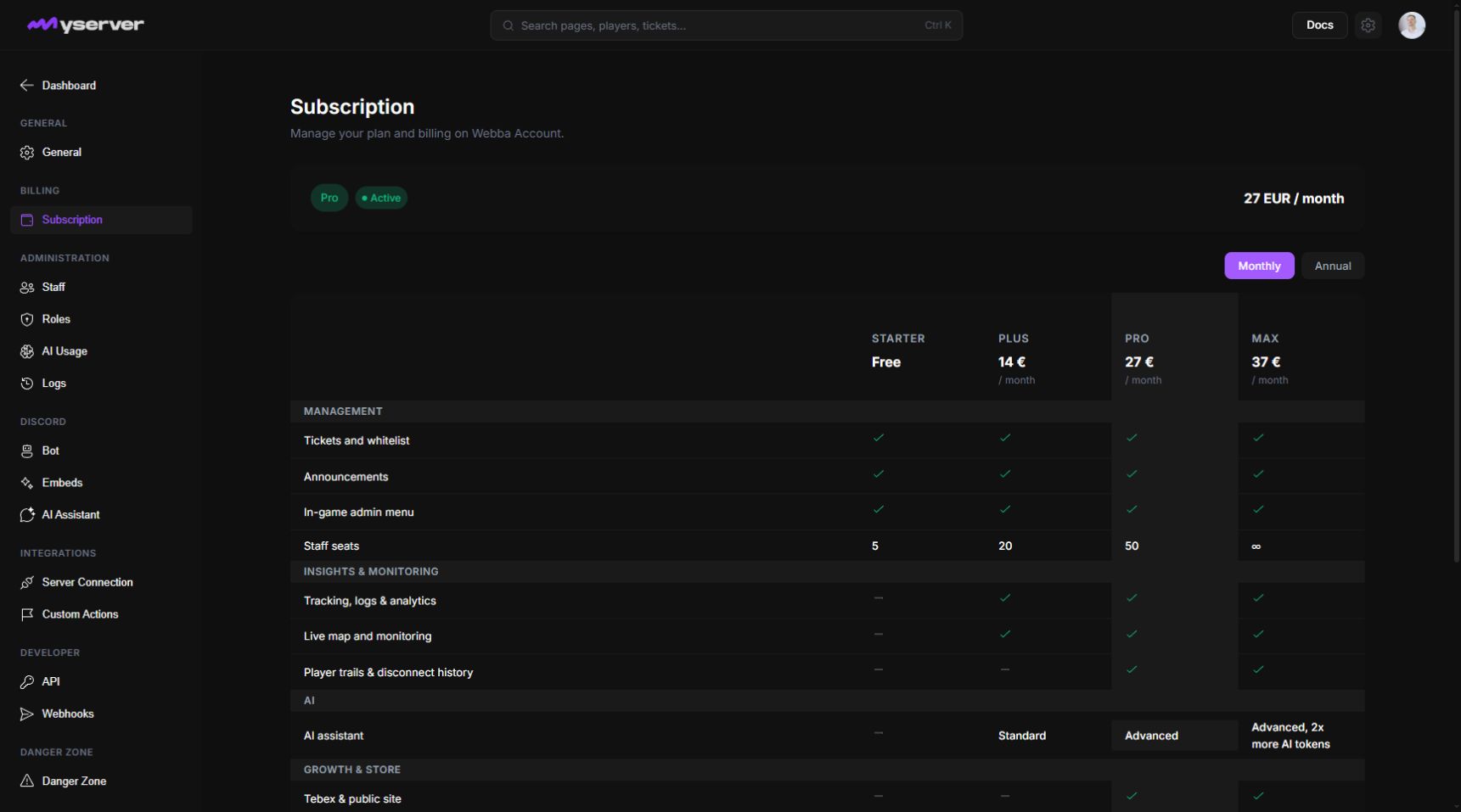
Review the current plan and make a change
The summary identifies the plan and subscription state. Paid plans can also show the current billing period or renewal information.
The comparison table is the authoritative product view for current plan names and included features.
Only the server owner can start or manage a plan change. Billing continues through Webba Account and the configured Tebex subscription flow.
Follow the checkout or management link from Platform. After a completed change, return to the server and verify the plan and status before configuring newly available features.
Prepare for cancellation, expiry, or downgrade
A subscription can remain active until the end of its paid period after cancellation. When the paid period expires, the server returns to the Starter feature set according to the current billing rules.
Before downgrading, review staff seat limits and features that will become unavailable. Export or reconfigure dependent workflows where appropriate.
Last updated: September 11, 2026