RedM documentation
Murphy's Barber
Reference
Character Creator Integration - SetClothesForChar & SetHairForChar
Barber: Creator integration reference with a real storefront demo screenshot and its source.
Official API for external character creators / selectors (e.g. Spooni Character Creator) that need to hand a finished look to murphy_clothing and murphy_barber so it persists and re-applies on every spawn.
Requires: murphy_clothing 3.44.0+ and murphy_barber 1.21.0+.
These two exports are stable API - their signatures and data format will not change across versions. Do not write into the murphy_clothes / murphy_barber SQL tables directly: the exports validate, store and re-apply exactly like the shop/barber would, and keep working if the storage layer changes.
Quick start
Both exports:
- are server-side only;
- work for online and offline characters - write the row at creation time, it is picked up on the character's next spawn. If the player is online right now, the look is re-applied on screen instantly;
- return
trueon success, orfalse, "error message"if the payload is malformed (nothing is written in that case).
Who owns which category
| Resource | Categories |
|---|---|
| murphy_clothing | All clothing: hats, coats, shirts_full, vests, pants, boots, masks, accessories, ... |
| murphy_barber | hair, hair_bonnet, beard, beards_complete, beards_chin, beards_mustache, beards_chops + makeup/face overlays |
SetClothesForChar silently strips essential categories (skin, heads, body, hair, beard, ...) exactly like a normal shop save - hair sent to the clothing export is discarded, not saved. Always call both exports.
The charid parameter
The framework's character identifier, passed as-is (the exports treat it as opaque - int or string both work):
| Framework | Value |
|---|---|
| VORP | charIdentifier (number) |
| RSG / QBR | citizenid (string) |
| REDEMRP2k23 | citizenid |
Data format: the murphy index format
Both exports take the same shape for clothing/hair entries:
model is not a game hash - it is an index into the catalog shipped unencrypted in shared/murphy_assets.lua of each resource. Setting model = 0 means "nothing equipped in this category".
Mapping your GUIDs / hashes to catalog indexes
MURPHY_ASSETS is structured as MURPHY_ASSETS[gender][category] (gender = "male" / "female"), an ordered array where each entry is one of:
- Drawable/NPC asset:
{ drawable = <hash>, variants = { { albedo = ..., normal = ..., material = ..., palette = ..., tint = {...} }, ... } }→ find the index whosedrawableequals your GUID; thetexture.palettevalue selects the entry invariants. - MP/hash asset: an array of
{ hash = <hash>, ... }entries → find the index whose entries contain your hash; the baretexturenumber selects which entry.
A simple reverse-lookup you can build once at startup:
exports.murphy_clothing:SetClothesForChar(charid, clothes, outfitId)
| Param | Type | Description |
|---|---|---|
charid |
number/string | Framework character identifier (see above) |
clothes |
table | Murphy index format, one entry per category |
outfitId |
number (optional) | Saved-outfit preset id to link; defaults to 0 (no preset) |
Behavior:
- Essential categories are stripped like a normal save.
- UPSERTs the character's row in
murphy_clothes. - Fires the server event
murphy_clothing:clothesUpdated(source, charid, clothes)after every write (sourceisnilwhen the character is offline). - If the player is online, pushes
murphy_clothing:loadclothesto their client so the outfit applies immediately.
exports.murphy_barber:SetHairForChar(charid, hairstyle, overlays)
| Param | Type | Description |
|---|---|---|
charid |
number/string | Framework character identifier |
hairstyle |
table | Murphy index format; categories: hair, hair_bonnet, beard, beards_complete, beards_chin, beards_mustache, beards_chops |
overlays |
table (optional) | List of overlay layer records (see below). Pass nil to leave the character's stored overlays untouched |
Behavior:
- UPSERTs the character's row in
murphy_barberand resets its preset link (outfit_id = 0). - If
overlaysis provided, the layers are split into makeup vs permanent overlays viaConfig.Overlayitems, exactly like a barber save. Ifnil, existing overlays are preserved. - If the player is online, pushes
murphy_barber:loadbarberoverlayto their client so the look applies immediately.
Overlay layer format
Each entry in overlays is a full layer record with a name field:
Overlay names - makeup (re-appliable items): eyeliners, shadows, paintedmasks, blush, blush2, foundation, lipsticks. Permanent (face features): eyebrows, scars, scars2, scars3, acne, beardstabble, ageing, complex, disc, freckles, grime, hairstabble, moles, spots. (The exact split is the server's Config.Overlayitems.)
Reading the other direction
To stay in sync when players change their look in the murphy shops:
- Event:
murphy_clothing:clothesUpdated(source, charid, clothes)- server event fired after every clothing save (shop, outfit swap, orSetClothesForChar). - Export:
exports.murphy_clothing:GetPlayerClothes(source)- returns the online player's worn set with resolved hashes:{ [category] = { hash, drawable, albedo, normal, material, palette, tint0, tint1, tint2 } }. - Export:
exports.murphy_barber:ReloadAppearance(source)- re-applies the stored barber look on top of a freshly loaded skin (useful after revives / skin reloads).
Common pitfalls
- Don't write the SQL tables directly. Formats and constraints can change between versions; the exports are the stable contract.
- Hair in the clothing export is discarded (essential-category strip). Use
SetHairForChar. modelindexes are gender-specific. An index valid inMURPHY_ASSETS.male.hairis not necessarily valid inMURPHY_ASSETS.female.hair- map against the catalog for the character's gender.- Check the return value.
false, errmeans nothing was written - logerrduring integration.
Illustrated integration
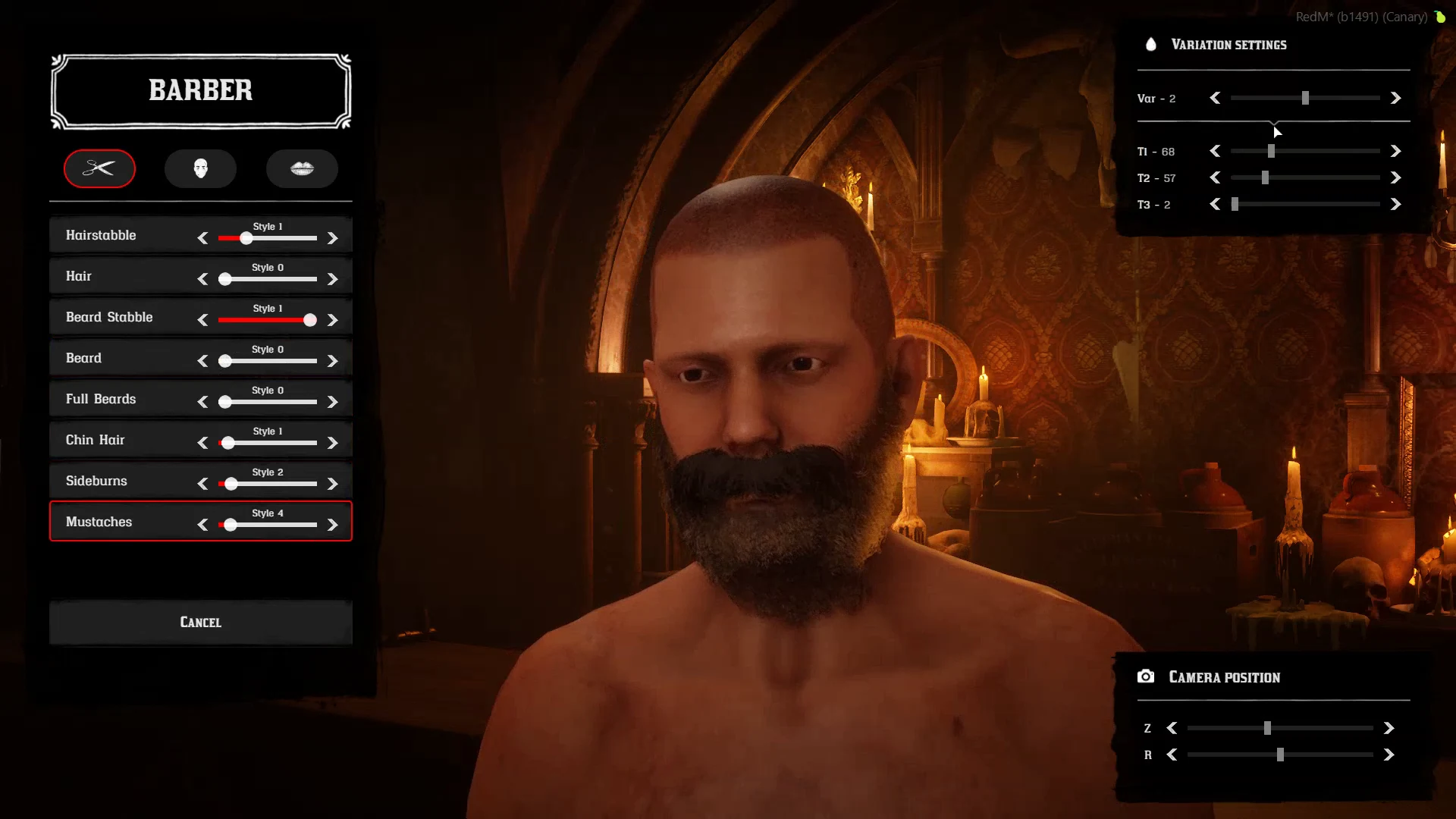
This real frame comes from the Creator storefront video. The recording does not identify its plugin version or framework. It illustrates the visible integration; it does not validate the API examples above on every framework.
Last updated: September 9, 2026